
- WooCommerce advanced product filters
- WooCommerce catalog filter plugin
- WooCommerce brand filter
- WooCommerce category finder
- Industrial product finder
- WooCommerce AJAX product filters
- WooCommerce specification filter
Smart Label Finder for WooCommerce
$350.00
Description
Smart Label Finder for WooCommerce
Turn large WooCommerce catalogs into fast, searchable product experiences.
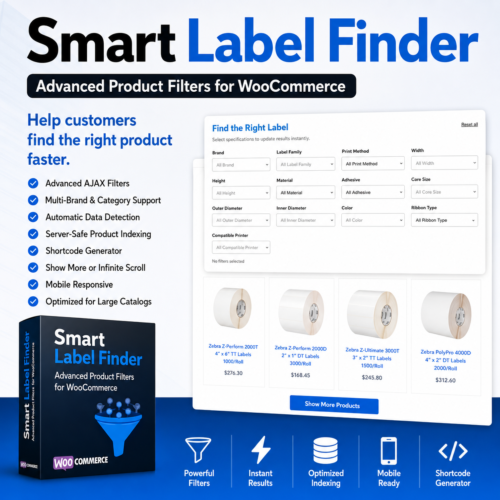
Smart Label Finder gives customers a clean, visual way to narrow products by brand, category, size, material, compatibility, specifications, and other product data—without forcing them to search through hundreds or thousands of listings manually.
Built for industrial suppliers, label distributors, hardware resellers, parts catalogs, and other complex WooCommerce stores.
One-time license. No monthly subscription.
[Buy Smart Label Finder]
[View Features]
Help Customers Find the Right Product Faster
Standard WooCommerce category pages are not designed for large technical catalogs.
Customers may know the brand, dimensions, material, printer model, part number, or application they need—but still struggle to locate the correct listing.
Smart Label Finder transforms that experience into an organized product finder with visible filters and instant results.
Customers can filter products by:
- Brand
- Product category
- Product family
- Width and height
- Print method
- Material
- Adhesive type
- Core size
- Outer diameter
- Inner diameter
- Color
- Ribbon type
- Compatible printer
- Part number
- Custom product specifications
Results update automatically as filters are selected or removed.
Designed for Complex WooCommerce Catalogs
Smart Label Finder was created for stores where products have detailed specifications and many closely related variations.
It is ideal for:
- Barcode and label suppliers
- Thermal printing companies
- Industrial equipment distributors
- POS hardware providers
- Packaging suppliers
- Electronics resellers
- Medical and laboratory suppliers
- Automotive parts stores
- Manufacturing catalogs
- Wholesale and B2B WooCommerce stores
It can also be used as a general product finder across almost any WooCommerce catalog.
Key Features
Automatic Product Indexing
The plugin scans your WooCommerce catalog and builds an optimized product index.
It can extract data from:
- Product titles
- SKUs
- Short descriptions
- Full descriptions
- Categories
- Product tags
- WooCommerce attributes
- Product metadata
The index is stored separately from your primary WooCommerce product queries to improve storefront performance.
Intelligent Specification Detection
Smart Label Finder can recognize common product data contained in product titles and descriptions.
Examples include:
TTas Thermal TransferDTas Direct ThermalODas Outer DiameterIDas Inner Diameter- Product dimensions such as
4 × 6 - Core sizes
- Labels per roll
- Rolls per case
- Manufacturer part numbers
- Product families
- Material types
- Adhesive types
- Printer model references
Detected data can be reviewed and corrected from the WordPress dashboard.
Visual Storefront Filters
Instead of displaying only a basic search box, Smart Label Finder shows customers the filter choices available for the selected catalog.
The storefront interface includes:
- Clean dropdown filters
- Searchable product options
- Instant AJAX results
- Active-filter tracking
- Reset-all controls
- Responsive mobile layout
- Matching-product counts
- Show More pagination
- Optional infinite scrolling
Customers do not need to reload the page each time they change a filter.
Brand and Category Control
Use one plugin across your entire WooCommerce store.
Each product finder can be restricted to:
- One brand
- Multiple brands
- One category
- Multiple categories
- Parent and child categories
- The entire indexed catalog
Create separate finders for different product lines without installing multiple filter plugins.
Example:
[smart_label_finder brand="Zebra" category="zebra-labels"]Another page can use:
[smart_label_finder brands="Honeywell,Epson" categories="printers,printer-accessories"]Built-In Shortcode Generator
You do not need to write shortcodes manually.
The WordPress dashboard includes a visual shortcode generator where you can:
- Select one or multiple brands
- Select one or multiple categories
- Include child categories
- Choose the number of products initially shown
- Select Show More, infinite scroll, or numbered pagination
- Show or hide the Brand filter
- Customize the filter-box title
- Customize the filter-box subtitle
- Copy the completed shortcode
Paste the shortcode into Avada, Elementor, Gutenberg, Divi, WPBakery, or any shortcode-compatible page builder.
Server-Safe Product Scanning
Large product catalogs can overwhelm poorly designed filtering plugins.
Smart Label Finder processes products in controlled batches rather than attempting to scan an entire catalog in one request.
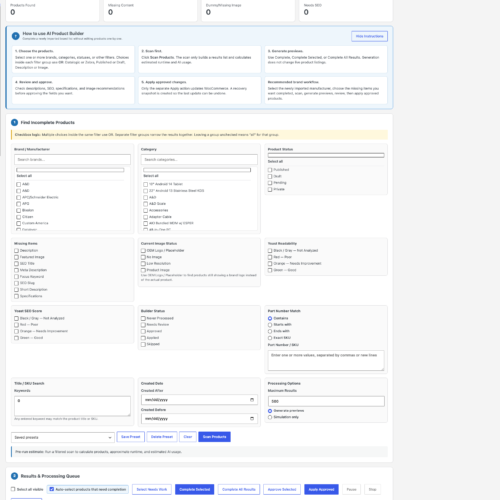
The scanner includes:
- Adjustable batch sizes
- One-click continuous scanning
- Pause and resume controls
- Automatic retry handling
- Products processed
- Products remaining
- Completion percentage
- Elapsed time
- Estimated time remaining
- Estimated completion time
- Products processed per minute
This helps reduce PHP timeouts, memory spikes, and unnecessary server load.
Optimized for Large Catalogs
Smart Label Finder does not repeatedly search every WooCommerce product and metadata record during each customer filter request.
Instead, it uses a dedicated product index designed for faster filtering.
Benefits include:
- Faster filter results
- Lower database load
- Fewer expensive metadata queries
- Better performance on large catalogs
- Faster part-number searches
- Incremental product updates
- No need to rebuild the entire index after every product change
Flexible Product Loading
Choose how products are displayed below the filter panel.
Show More Button
Customers can load additional products without leaving the page.
Infinite Scroll
Additional products load automatically as the customer reaches the bottom of the results.
Numbered Pages
Traditional pagination remains available when preferred.
Customize Every Finder
Different pages can have different titles and instructions.
Example:
[smart_label_finder
brand="Zebra"
category="zebra-labels"
title="Find the Right Zebra Label"
subtitle="Choose your label size, material, print method, and core size."
]
Another finder can display:
[smart_label_finder
brand="A&D"
category="scales"
title="Find the Right Scale"
subtitle="Filter available models by capacity and specifications."
]
Works With Your Existing WooCommerce Products
Smart Label Finder is designed to work with the catalog you already have.
It does not need to:
- Change product URLs
- Rewrite product titles
- Replace descriptions
- Modify SEO metadata
- Change canonical URLs
- Alter product prices
- Change inventory
- Modify orders
- Replace your WooCommerce theme
The plugin creates and uses its own index while leaving your existing product content intact.
SEO-Friendly Architecture
The plugin is designed to improve catalog usability without changing the SEO structure of your store.
It does not automatically rewrite:
- Permalinks
- Product slugs
- SEO titles
- Meta descriptions
- Canonical tags
- Product schema
- Category URLs
Your existing indexed product and category pages remain in place.
Compatible With Popular WordPress Builders
Smart Label Finder can be embedded using a standard shortcode.
Compatible environments include:
- Avada
- Elementor
- Gutenberg
- Divi
- WPBakery
- Bricks
- Standard WordPress pages
- WooCommerce category landing pages
Basic shortcode:
[smart_label_finder]Easy Setup
1. Install the Plugin
Upload the plugin ZIP through the WordPress Plugins page.
2. Select Products to Index
Choose the brands and categories you want the plugin to scan.
3. Build the Index
Run the server-safe indexing process from the WordPress dashboard.
4. Generate a Shortcode
Use the built-in generator to select brands, categories, layout settings, and page titles.
5. Add It to Your Website
Paste the generated shortcode into any compatible WordPress page or builder.
Frequently Asked Questions
Does the plugin modify my WooCommerce products?
No. The plugin can read product information and store extracted values in its own index. It does not need to change your product titles, URLs, prices, descriptions, or SEO metadata.
Will it work with a large catalog?
The plugin was designed with larger catalogs in mind. Products are indexed in controlled batches, and customer filtering uses a dedicated index instead of repeatedly searching the entire WooCommerce metadata structure.
Can I use it for more than labels?
Yes. Although it was initially developed around detailed label specifications, the finder can be used for printers, scales, hardware, industrial equipment, supplies, parts, and other technical catalogs.
Can one plugin power multiple pages?
Yes. Create separate shortcodes for different brands, categories, or product groups.
Can customers filter results without reloading the page?
Yes. Results refresh automatically using AJAX when customers select or remove filters.
Can I customize the title displayed above the filters?
Yes. Both the title and subtitle can be customized for every shortcode.
Does it support multiple brands and categories?
Yes. A finder can include one or multiple brands and one or multiple product categories.
What happens if I deactivate the plugin?
The product finder will stop displaying, but your WooCommerce products, URLs, SEO content, prices, orders, and inventory remain unchanged.
Does it work with Avada?
Yes. Add the generated shortcode to an Avada Text Block, Code Block, or other shortcode-compatible element.

Reviews
There are no reviews yet.